文档模板
列表
有序列表
超级链
以太坊
蚂蚁链
无序列表
超级链
以太坊
蚂蚁链
术语表
- UTXO
UTXO 是来自比特别的一个概念
含义是未来花费输出
- 智能合约
智能合约是运行在区块链上的一段可执行程序
字段表
- Date
2001-08-16
- Version
1
- Authors
Me
Myself
I
- Indentation
Since the field marker may be quite long, the second and subsequent lines of the field body do not have to line up with the first line, but they must be indented relative to the field name marker, and they must line up with each other.
- Parameter i
integer
选项表
命令行手册必备
- -a
command-line option “a”
- -1 file, --one=file, --two file
Multiple options with arguments.
doctest 块
This is an ordinary paragraph.
>>> print 'this is a Doctest block'
this is a Doctest block
The following is a literal block:
>>> This is not recognized as a doctest block by
reStructuredText.  It *will* be recognized by the doctest
module, though!
表格
基于网格的表格:
+------------------------+------------+----------+----------+
| Header row, column 1   | Header 2   | Header 3 | Header 4 |
| (header rows optional) |            |          |          |
+========================+============+==========+==========+
| body row 1, column 1   | column 2   | column 3 | column 4 |
+------------------------+------------+----------+----------+
| body row 2             | Cells may span columns.          |
+------------------------+------------+---------------------+
| body row 3             | Cells may  | - Table cells       |
+------------------------+ span rows. | - contain           |
| body row 4             |            | - body elements.    |
+------------------------+------------+---------------------+
渲染出来长这个样子
Header row, column 1 (header rows optional) |
Header 2 |
Header 3 |
Header 4 |
|---|---|---|---|
body row 1, column 1 |
column 2 |
column 3 |
column 4 |
body row 2 |
Cells may span columns. |
||
body row 3 |
Cells may span rows. |
|
|
body row 4 |
|||
如果你发现你的表格怪怪的,那可能是写错了
也可以使用简答表格,写起来比较简单 这样的表格:
=====  =====  =======
A      B    A and B
=====  =====  =======
False  False  False
True   False  False
False  True   False
True   True   True
=====  =====  =======
渲染出来长这样
A |
B |
A and B |
|---|---|---|
False |
False |
False |
True |
False |
False |
False |
True |
False |
True |
True |
True |
也可以用 CSV 来组织表格:
.. csv-table:: Frozen Delights!
   :header: "Treat", "Quantity", "Description"
   :widths: 15, 10, 30

   "Albatross", 2.99, "On a stick!"
   "Crunchy Frog", 1.49, "If we took the bones out, it wouldn't be
   crunchy, now would it?"
   "Gannet Ripple", 1.99, "On a stick!"
渲染出来的结果
Treat |
Quantity |
Description |
|---|---|---|
Albatross |
2.99 |
On a stick! |
Crunchy Frog |
1.49 |
If we took the bones out, it wouldn’t be crunchy, now would it? |
Gannet Ripple |
1.99 |
On a stick! |
或者用嵌套列表:
.. list-table:: Frozen Delights!
   :widths: 15 10 30
   :header-rows: 1

   * - Treat
      - Quantity
      - Description
   * - Albatross
      - 2.99
      - On a stick!
   * - Crunchy Frog
      - 1.49
      - If we took the bones out, it wouldn't be
         crunchy, now would it?
   * - Gannet Ripple
      - 1.99
      - On a stick!
渲染出来是这样子的
Treat |
Quantity |
Description |
|---|---|---|
Albatross |
2.99 |
On a stick! |
Crunchy Frog |
1.49 |
If we took the bones out, it wouldn’t be crunchy, now would it? |
Gannet Ripple |
1.99 |
On a stick! |
标题
按照 python 文档规范:
# with overline, for parts
* with overline, for chapters
=, for sections
-, for subsections
^, for subsubsections
", for paragraphs
交叉引用(这里标题变了上边标题也会变)
交叉引用主要是用于引用文档内的位置或者某个文档,相比直接用超链接优势在于
你可以随便修改文档名称,重新组织文档目录结构,不会影响文档引用的正确性
当被引用处的标题发生变化,引用处会自动更新
交叉引用语法直接用我们在这里用到的这个作为例子
被引用处打标签:
.. _cross-reference:

交叉引用(这里标题变了上边标题也会变)
^^^^^^^^^^^^^^^^^^^^^^^^^^^^^^^^^^^^^^
交叉引用主要是用于引用文档内的位置或者某个文档,相比直接用超链接优势在于
* 你可以随便修改文档名称,重新组织文档目录结构,不会影响文档引用的正确性
* 当被引用处的标题发生变化,引用处会自动更新
引用处按照标签引用:
内部链接使用 :ref:`cross-reference` 语法
引用处不需要关心标题(回去再看看效果)
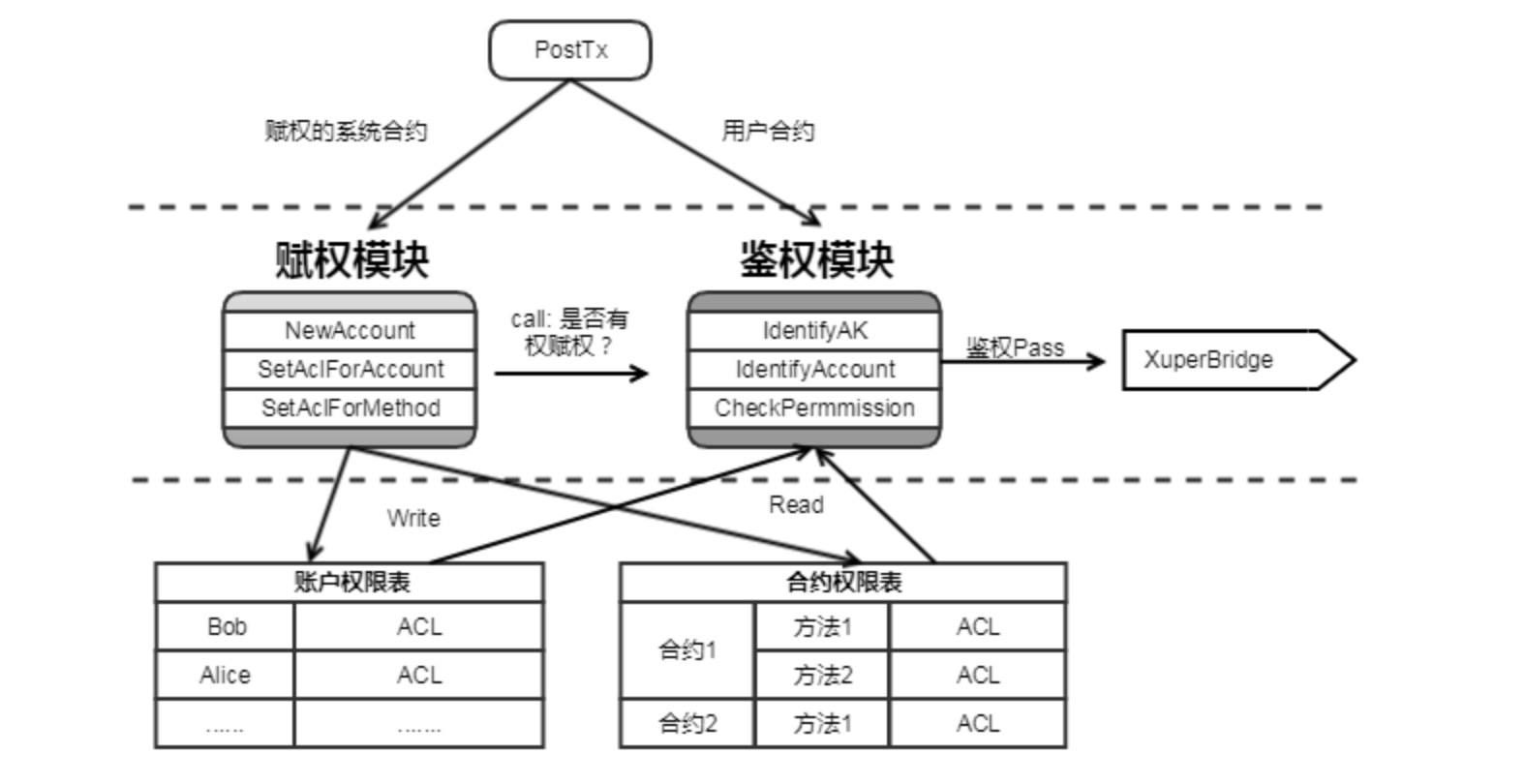
插入图表
通过插件支持各种绘图工具(gnuplot/opg/asciart/data url/略缩图/ PlantUML /dot/图片高级操作),没有逐个验证,可以自行迎探索 or @陈逢锦
感觉用 PlantUML 来画各种图会比较有想象空间
高级段落标记
危险
这是一段带感情色彩的文本
警告
这是一段带感情色彩的文本
小技巧
这是一段带感情色彩的文本
注解
这是一段带感情色彩的文本
重要
这是一段带感情色彩的文本
提示
这是一段带感情色彩的文本
错误
这是一段带感情色彩的文本
警告
这是一段带感情色彩的文本
注意
这是一段带感情色彩的文本
侧边栏
代码
def my_function():
    "just a test"
    print 8/2
标签页
两个 tab 联动,简直是为 XuperChain 而生,合约部署相关文档不再难写(看看效果)
Linux Line 1
Mac OSX Line 1
Windows Line 1
Linux Line 1
Mac OSX Line 1
Windows Line 1
也可以在标签页里写代码,自动高亮
int main(const int argc, const char **argv) {
  return 0;
}
int main(const int argc, const char **argv) {
  return 0;
}
def main():
    return
class Main {
    public static void main(String[] args) {
    }
}
function main()
end
PROGRAM main
END PROGRAM main
域
域通常用来支持语言相关操作,自动解析语言的代码,在进行代码讲解的时候比较游有用
这段代码:
.. py:function:: send_message(sender, recipient, message_body, [priority=1])

   Send a message to a recipient

   :param str sender: The person sending the message
   :param str recipient: The recipient of the message
   :param str message_body: The body of the message
   :param priority: The priority of the message, can be a number 1-5
   :type priority: integer or None
   :return: the message id
   :rtype: int
   :raises ValueError: if the message_body exceeds 160 characters
   :raises TypeError: if the message_body is not a basestring
被解析成这个样子
-
send_message(sender, recipient, message_body[, priority=1])¶ Send a message to a recipient
- 参数
sender (str) – The person sending the message
recipient (str) – The recipient of the message
message_body (str) – The body of the message
priority (integer or None) – The priority of the message, can be a number 1-5
- 返回
the message id
- 返回类型
int
- 引发
ValueError – if the message_body exceeds 160 characters
TypeError – if the message_body is not a basestring
也可以用来做交叉引用,在你的代码更新的时候内容自动更新
代码高亮
代码高亮用 code-block
func (c *counter) Initialize(ctx code.Context) code.Response {
   creator, ok := ctx.Args()["creator"]
   if !ok {
      return code.Errors("missing creator")
   }
   err := ctx.PutObject([]byte("creator"), creator)
   if err != nil {
      return code.Error(err)
   }
   return code.OK(nil)
}
也可以用 highlight, 或者用 literalinclude 引入一个完整的代码文件
入门部分总结一下
内容与样式分离是前端/排版等领域的共识
这个文档在会提交分享个大家看中哪个样式直接用就可以了
Sphinx 是堪比 Word 的 WYSIWYG 排版工具,功能十分强大,但是内容还是需要我们来写